An AI customer service agent that answers every message instantly, from your own website, docs and FAQs.
It learns your website, docs and FAQs, then answers on chat, WhatsApp, Instagram, SMS and the phone, booking appointments and capturing leads while you get on with your day.
Do you take walk-ins on weekends?
Paste your website — no signup, no card. It answers from your own pages.
Free plan, no credit card. Live on your site the same day.
- Every channel in one thread
- Phone answering on every plan, Free included
- White-label it for your clients
Your whole support stack, answering as one.
Two ways people use Evoriqa
The platform is the same. The commercial model, the console and the conversation we'll have with you are not.
What the platform does today
- Every live answer scored 0 to 100
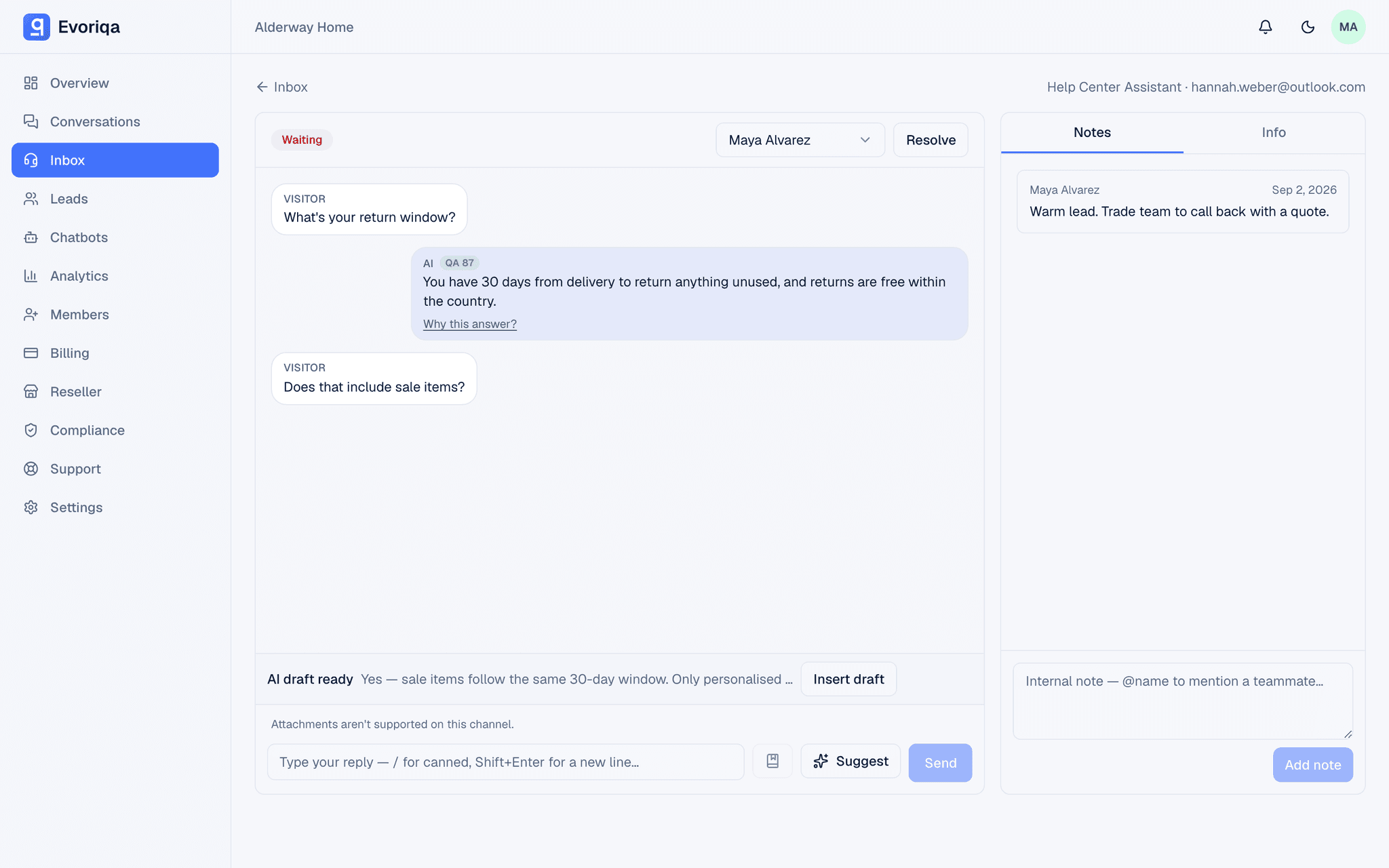
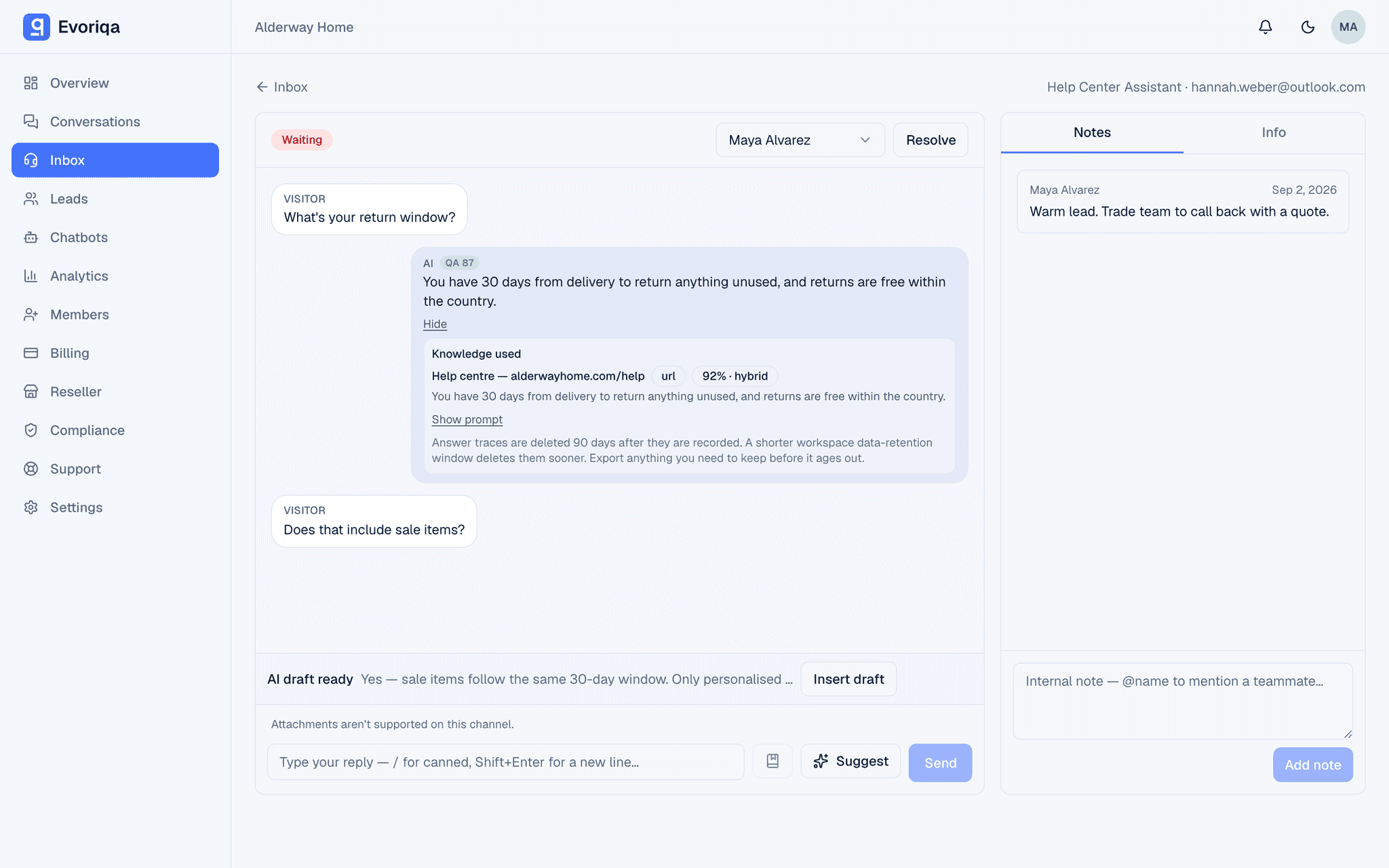
- Why this answer: the sources behind each reply
- Shadow mode: AI drafts, you approve
- 8 supported customer channels
- Answers from your own content, not made up
- Human handoff with full context
- In-chat booking and AI actions
- Industry starter templates
- White-label client workspaces
- Usage and credit controls
One brain, every channel
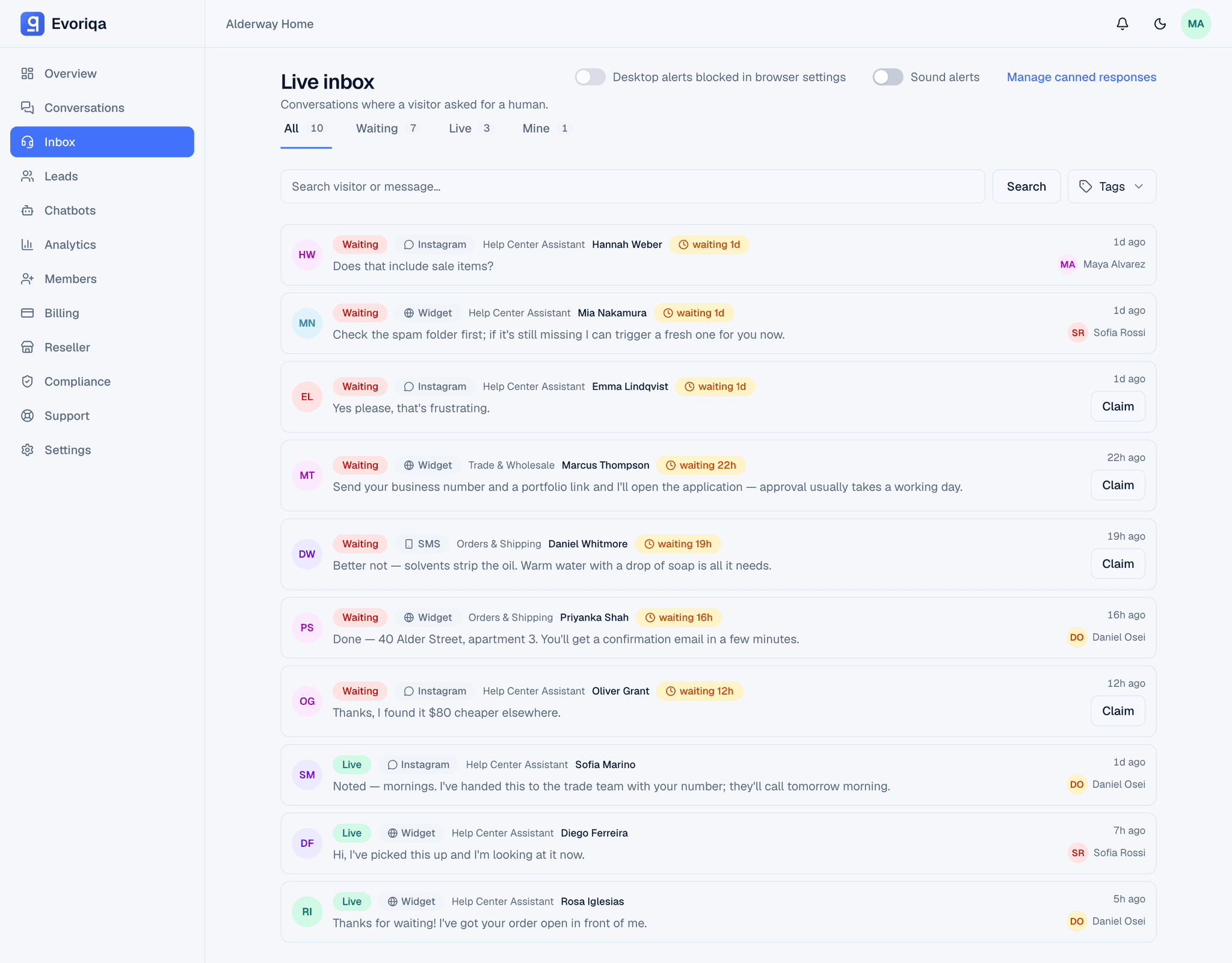
Every way in, one inbox to answer from. The knowledge, the personality and the approved actions stay the same whichever channel a customer picks.
It answers the phone, too
The same agent that answers your chat picks up your inbound line, and every call lands in the inbox above as a transcript.
- Answers inbound calls 24/7 in natural speech
- Same knowledge and actions as chat
- Books on connected calendars and captures details by voice
- Warm transfer to a human when it's needed
- Full call transcripts in your unified inbox
Included on every plan.
Conversations that finish something
Answering the question is the easy part. Here is the rest.
What setting one up looks like
Configuration rather than engineering. We walk through the first pass with you.
In minutes: point it at your website, watch it answer your real questions in the playground, then drop one script tag to go live.
- 1Add website pages, documents and FAQs
- 2Review the imported knowledge
- 3Test real questions in the playground
- 4Configure approved actions and escalation
- 5Connect the channels you use
- 6Monitor outcomes and knowledge gaps
What changes for your support team
The repetitive volume and the after-hours gap stop being your team's problem.
Run AI support as a service, under your own brand
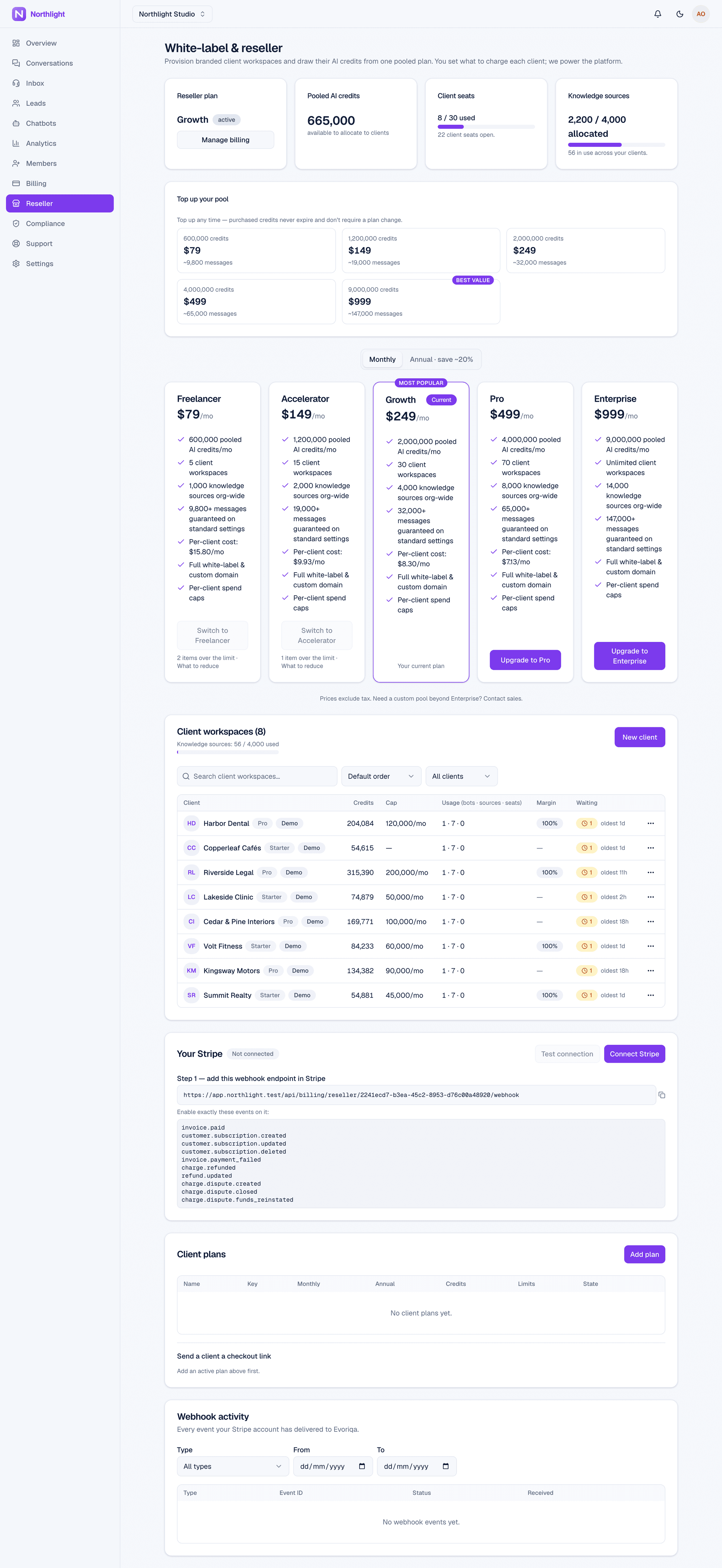
One console, every client. Branded workspaces, pooled usage credits you allocate, per-client limits, and performance you can report on — priced however your agency wants to price it.
- 1Create a client workspace
- 2Apply your agency branding
- 3Add that client's knowledge
- 4Configure channels and actions
- 5Allocate usage from your pool
- 6Set client-level limits
- 7Review performance per client
- 8Bill clients on your own Stripe: your plans, your prices, your payouts
- 9Your clients never see or contact Evoriqa; you support them, we support you
It knows what it doesn’t know
When a conversation needs a person it escalates with everything already attached. When an answer is missing, that gap becomes a measurable thing you can fix.
Escalation with the context intact
- Escalates on customer request, detected intent, or your own rules
- Your teammate gets the full transcript and customer details
- Internal notes stay internal; the suggested reply is a draft, not a send
- The conversation keeps its history when it goes back to the agent
Quality you can inspect
- Test questions you re-run before customers see a change
- Live AI QA — an AI judge — scores every answer 0 to 100, with its sources in your dashboard
- Unanswered questions recorded as knowledge gaps
- Failed actions and escalation reasons, surfaced not buried
Not ready to let it send? Shadow mode drafts every reply for your team to approve — until the approval numbers say it’s earned autonomy.
Why we built this
Every small team we talked to was having the same week. The same ten questions, asked again and again, across a website chat, two social inboxes and a phone that rings while you’re serving someone else. Messages missed at 9pm. A customer asking something the team had already answered on their own website, three years ago.
What struck us is that nobody was short of answers. The answers were already written down — in their site, their docs, the replies they type out every day. They were just trapped somewhere a customer at 11pm couldn’t reach.
So we built the thing we kept describing to them: one agent that learns from what you’ve already written, answers wherever someone asks, shows where each answer came from, and says “I don’t know” and fetches a human rather than guessing. It won’t replace your team. It gives them back the hours the same ten questions were taking.
What it's like to run it
A salon answering its DMs, an agency selling it under its own name, and our own product on the same agent. In their words, not ours.
“I set it up expecting to switch it off by the weekend. Before, those DMs waited till a free minute between clients. Then someone asked bridal prices at eleven at night on Instagram, and it showed where it got that. Now I barely check it.”
- Website chat
- Client workspaces
“I sell this to my clients in the US as my own product. Before, each one meant another tool to wire up and support myself. Now they get a chat on their site, under my brand, that answers questions and books appointments. One asked which dev team built it.”
- Case study
- Website chat
SlimAI runs its support on Evoriqa
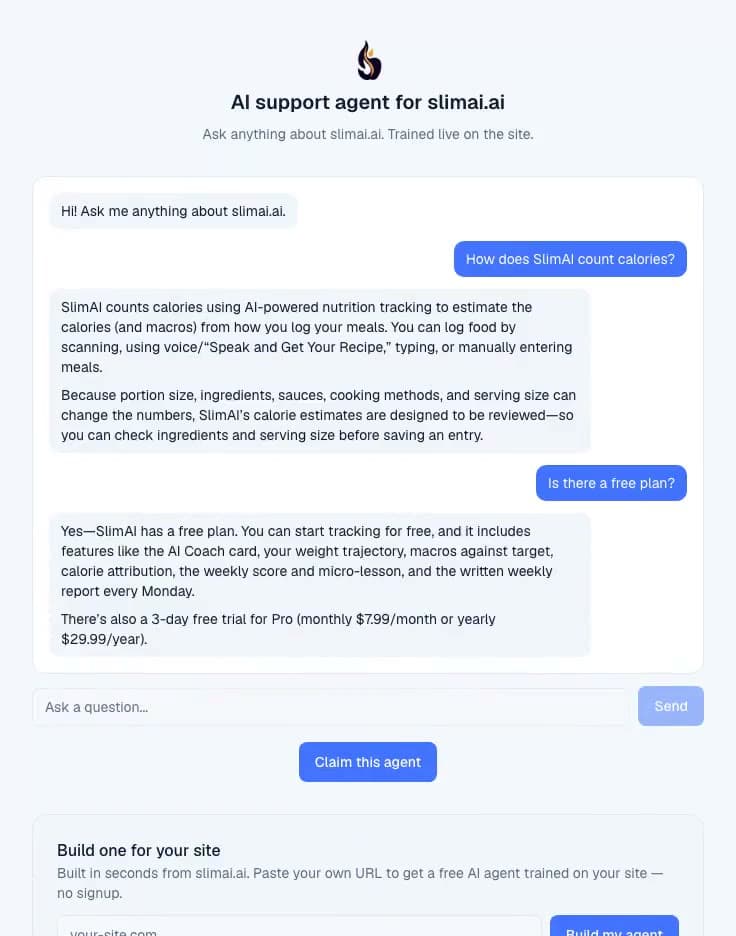
SlimAI is a Techparser product, like Evoriqa. Its website chat and Instagram DMs run on the same agent sold here: it answers pre-sales questions from SlimAI's own docs and hands the conversation to the team when it isn't sure.
See the widget live on slimai.aiAnd everything around it
The parts you don't think about until you're running support on it every day. All of it is in the product now, on every plan unless the page says otherwise.
Inbox & teamwork
- SLA chips on what is waiting
- Assign, @mention and internal notes
- Canned replies with /shortcuts
- Copilot draft replies and handoff summaries
- File attachments on web and email replies
- CSAT ratings with the comments beside them
Knowledge & quality
- Crawl a site, then re-crawl on your schedule
- Read back exactly what a source taught it
- Unanswered questions become FAQs in one click
- Every live answer scored 0–100 by an AI judge
- “Why this answer” — the sources and prompt behind each reply
- Eval cases you re-run on every change
- Answers in the language the customer wrote in
Reach & channels
- 8 channels, including the phone
- AI on or off per channel
- Failed sends flagged, with one-click retry
- Timezone-aware business hours and away message
- Proactive triggers in the widget
- An embeddable AI search bar for help centres
Control & platform
- Spend caps, burn alerts and top-ups
- Audit log, GDPR export and erasure
- Your own domain, added self-serve
- Signed webhooks into your own systems
- A REST API with scoped keys, on every plan
- A support desk inside your dashboard
Controls around real customer conversations
The agent handles your customers' messages and your business knowledge. These are the controls that come with it.
Audit trail
Every security and account event is logged: who did what, when, with CSV export.
GDPR export & erasure
Per-workspace data export and right-to-be-forgotten delete, built in.
Data retention
Set a per-workspace window; a daily job auto-purges old conversations and messages.
Secrets encrypted at rest
Channel credentials are AES-GCM encrypted at rest and are not exposed to the model or to client-side code.
Enforced 2FA
TOTP two-factor enrollment and an enforced login challenge. Google sign-in accounts re-authenticate through Google before sensitive actions.
Outbound safety (allow-list)
Outbound agent actions are restricted to destinations you've explicitly allow-listed, with server-side protections on every outbound request.
Published pricing, for both models
Every plan is self-service — start free, upgrade when you outgrow it, cancel any time. No quote to request.
For businesses
- FreeNo cost
- Starter$29/mo$279/yr
- Pro$99/mo$948/yr
- Business$399/mo$3,828/yr
For agencies
- Freelancer$79/mo$756/yr
- Accelerator$149/mo$1,490/yr
- Growth$249/mo$2,490/yr
- Pro$499/mo$4,990/yr
- Enterprise$999/mo
Prices are in USD and exclude applicable taxes.
Frequently asked questions
The questions teams ask most before they start.
What is Evoriqa?
Evoriqa is a platform for building AI customer-support agents trained on your own knowledge. They answer instantly across every channel, capture leads, book appointments, take actions in your tools, and hand off to a human when needed, all from one dashboard.
What does setup involve?
Three steps: paste your website URL so we crawl it, brand the widget, and drop one script tag on your site. No engineers, no migration, and we walk you through it.
Where does the AI get its answers?
Only from the knowledge you give it: your crawled website, uploaded docs, and FAQs. It uses hybrid retrieval, lets you review the sources behind each answer in your dashboard, and says 'I don't know' instead of making things up.
Which channels can it support?
Your website widget, WhatsApp, Messenger, Instagram, SMS, Slack, email, and phone calls via the AI voice agent, all flowing into one unified inbox.
Can it do more than answer questions?
Yes. It can capture leads, book appointments via Cal.com or Calendly, look up orders, create tickets, and call your own APIs, with every action logged.
What happens when the AI can't help?
It hands off to a human with the full conversation context, and your agents get an AI copilot, canned replies, notes, SLAs, and CSAT.
Is my data secure?
Yes, encrypted secrets, enforced 2FA, audit logs, GDPR export and erasure, data-retention controls, and strict per-workspace tenant isolation.
How do I get started with Evoriqa?
Create your account at app.evoriqa.com and start on the Free plan — no credit card, no sales call. Point your first agent at your website or help docs, check the answers it gives, then connect the channels your customers already use.
Stop answering the same question twice
Point Evoriqa at your website and it learns your own content — the questions your customers actually ask, answered on the channels you actually use.